Maryville City Schools • Maryville, Tennessee • Grades 4 and Up • Issued Devices
The School Laptop Brought Home a Surveillance Network
When Maryville City Schools issues a laptop to your child, five separate monitoring systems come with it. They run at home. After hours. In your house. Without stopping.
We measured the data. Scroll to see the proof.
This page documents factual, publicly observable network behavior of a school-issued device. All findings were produced using Pi-hole, an open-source DNS logger any household can operate.
The Evidence
We Turned On a School Laptop and Watched What It Did
A network logging device called a Pi-hole was placed between a Maryville City Schools-issued laptop and the internet. The laptop was powered on, left idle, and not used for any browsing or schoolwork. Within the first two minutes, it was already transmitting data to multiple corporate servers.
Over the 20-minute observation window, the device generated 38,538 total DNS queries in the background of the full log period. The queries recorded during a single idle morning session reveal five distinct surveillance systems operating simultaneously.
Every 5–7 sec
Microsoft Telemetry Fires
While your child sits idle, Windows sends usage data to Microsoft’s telemetry servers continuously, logging behavioral patterns on the device.
Every 30 sec
DyKnow Screen Monitor Checks In
DyKnow’s classroom monitoring agent contacts its servers approximately every 30 seconds. It does not know, and does not care, that your child is home.
Every 30 sec
Securly Web Monitor Checks In
Securly’s agent also maintains a heartbeat every 30 seconds, keeping your home’s internet traffic routed through a school monitoring proxy.
Always On
Microsoft Intune Device Management
The school district holds administrator-level control over the device at all times via Microsoft Intune, regardless of whether your child is on school property.
Actual DNS Log — Idle Device, Home Network, Sunday Morning
| 08:40:57 | api.dyknow.me | [SCREEN MONITOR] |
| 08:40:56 | mobile.events.data.microsoft.com | [MS TELEMETRY] |
| 08:40:51 | self.events.data.microsoft.com | [MS TELEMETRY] |
| 08:40:49 | api.dyknow.me | [SCREEN MONITOR] |
| 08:40:47 | useast-www.securly.com | [WEB MONITOR] |
| 08:40:44 | wpad.lan | [TRAFFIC PROXY] |
| 08:35:08 | gbl9837ws.proctor.io | [EXAM PROCTORING] |
| 08:35:08 | gbl.proctorauth.com | [EXAM PROCTORING] |
| 08:35:22 | telemetry.proctorcollect.com | [PROCTOR TELEMETRY] |
| 08:22:47 | manage.microsoft.com | [SCHOOL DEVICE CONTROL] |
| 08:22:47 | device.autopatch.microsoft.com | [SCHOOL DEVICE CONTROL] |
| 08:27:35 | epmagent.manage.microsoft.com | [ENDPOINT AGENT] |
| 08:22:58 | agents.msua08.manage.microsoft.com | [MDM AGENT] |
Log captured via Pi-hole DNS logger on a private home network. The device was powered on and left idle. No browsing was performed during the observation window.
Who Is Watching
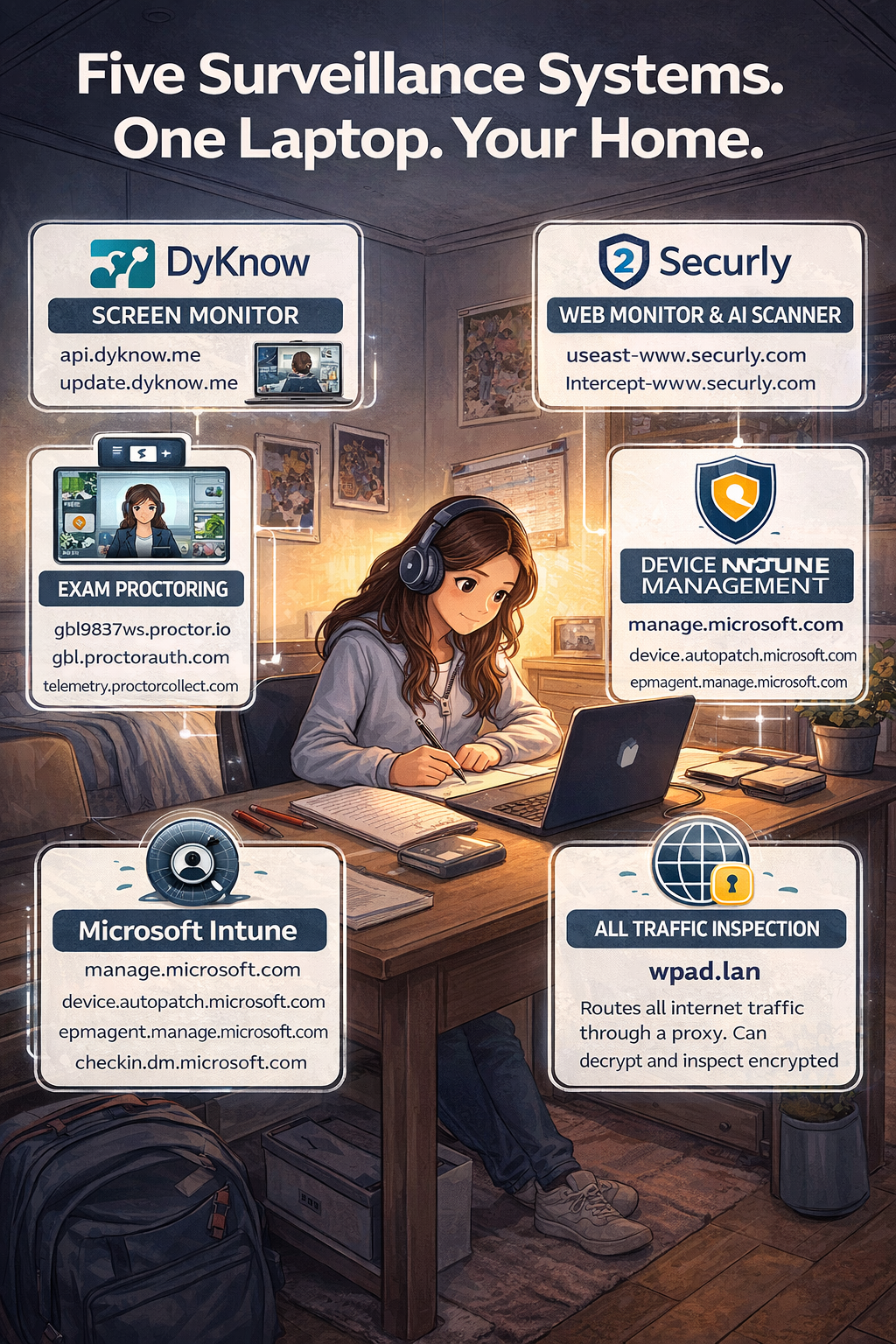
Five Surveillance Systems. One Laptop. Your Home.
Each of the following companies has a software agent installed on Maryville City Schools-issued laptops. Each one collects data independently. Each one stores that data on their own commercial servers.
|
DyKnow Screen Monitor |
api.dyknow.me |
DyKnow is real-time classroom screen monitoring software. When active, it allows teachers and administrators to view a live image of whatever is on your child’s screen, capture screenshots at any time, review the full history of every window and application your child has had open, and remotely lock the device.
The DNS log shows DyKnow’s agent making contact with DyKnow’s servers approximately every 30 seconds while the laptop was sitting unused at home on a Sunday morning. The software does not distinguish between school hours and personal time.
What this means for your child:
Any homework session, any personal project, any message typed on that device at home may be visible to a school employee or stored in DyKnow’s systems.
|
Securly Web Monitor & AI Scanner |
useast-www.securly.com |
Securly intercepts and analyzes all web traffic passing through the school laptop. It logs every website visited, every search query entered, and applies artificial intelligence to flag content it categorizes as concerning. Those flags can trigger automated alerts sent to school administrators and, depending on configuration, to parents.
When your child is home doing homework, Securly’s agent is still active. Search queries your child makes using the school laptop, even from your home network, travel through Securly’s monitoring infrastructure before reaching any search engine.
What this means for your child:
Every search your child types at home, whether for a history paper, a health question, or any sensitive personal topic, passes through a commercial company’s AI classifier before it reaches the internet.
|
Proctor.io Exam Proctoring |
gbl9837ws.proctor.io |
Online proctoring software is designed for exam supervision. When activated, it has the ability to access the device’s webcam, microphone, and screen simultaneously. It records video of the student and their physical surroundings, takes automated screenshots, and monitors keyboard inputs.
The presence of multiple proctoring domains in the DNS log, firing while the device was idle at home, indicates this software maintains an active background connection. When this software is triggered for an at-home exam, it can visually record the interior of your home.
What this means for your child:
During at-home exams, a camera in your child’s bedroom or living room is streaming video to a commercial proctoring company’s servers. The contents of your home are being recorded.
|
Microsoft Intune Device Management |
manage.microsoft.com |
Microsoft Intune is a Mobile Device Management (MDM) platform that gives the school district administrator-level control over the laptop at all times. Through Intune, the school can remotely install or remove software, push configuration changes, enforce policies, lock or wipe the device, and access information about what is installed on it.
The log shows the device’s management agent regularly checking in with Microsoft’s Intune servers. This infrastructure is what allows the school to maintain policy control over a device that is physically inside a private home.
What this means for your child:
The school district has a persistent administrative presence on a device that lives in your home. They can change how it works, what it can access, and what it records, at any time, without notifying you.
|
Traffic Proxy All Traffic Inspection |
wpad.lan |
The repeated appearance of wpad.lan in the log, in pairs, approximately every 30 seconds, indicates the device is configured to route all its internet traffic through a web proxy. Web Proxy Auto-Discovery (WPAD) is a protocol that allows a device to automatically find and connect to a proxy server on the network.
When combined with the monitoring tools above, this means a proxy can decrypt and inspect encrypted HTTPS traffic, a technique known as SSL inspection or “man-in-the-middle” interception. Nothing typed into a web form on a school laptop is private from this infrastructure, even if the website uses HTTPS.
What this means for your child:
The padlock icon in the browser does not protect your child’s data on this device. Traffic inspection infrastructure can read content that would otherwise be encrypted end-to-end.
After School Hours
The Bell Rings at 3pm. The Surveillance Does Not Stop.
The DNS evidence captured above was recorded on a Sunday morning. Not a school day. Not school hours. The device was sitting in a private home, connected to a private home internet connection, doing nothing. Every surveillance system aboard it was actively checking in.
The homework problem
Maryville City Schools requires students to use their issued laptop for homework assignments. This is not optional. Requiring a child to use a surveilled device to complete schoolwork means mandatory surveillance is a condition of participation in public education. A child who wants to research a term paper topic at home is doing so through monitoring software.
The bedroom problem
Many students do homework in their bedroom. A school laptop in a child’s bedroom, with an active webcam proctoring agent and screen monitoring software, represents a commercial surveillance apparatus inside the most private space a child occupies. Parents were not asked whether they consented to this arrangement in their own home.
“The data collection doesn’t pause when your child leaves school. The companies billing Maryville City Schools for their services are collecting data from inside your home, through a device your child is required to use.”
MaryvillePrivacy.org
The Permanent Record
Childhood Requires the Freedom to Make Mistakes. This System Eliminates That.
Developmental psychology has long recognized that children learn through trial, error, and course correction. A child who writes something angry, thinks better of it, and deletes it before sending is demonstrating exactly the kind of moral development we want to encourage. A surveillance system that captures the deleted draft and stores it permanently punishes that growth.
Documented nationally: Punishment for deleted messages
Cases have been documented across multiple school districts in which students were disciplined for email drafts, search queries, or messages that were never sent and never seen by another person. Screen monitoring software captures keystrokes and screen states continuously. A child can delete something, feel good about their decision, and still face consequences because the software already logged it.
This is not how childhood is supposed to work. The space to think, reconsider, and correct is not a loophole. It is the mechanism through which children develop judgment. Eliminating that space does not make children safer. It makes them afraid.
The search query that becomes evidence
A student researching a history paper might search for topics involving violence, conflict, extremism, or human tragedy. These are legitimate academic subjects. A student curious about their health might search for symptoms or medical questions. A student assigned a debate topic must research the opposition’s arguments. Securly’s AI content classifier does not know what assignment a child has been given. It flags content, not context. A flag can trigger an alert. An alert can trigger a disciplinary process. A disciplinary process creates a school record.
The algorithm making that determination was not written in Maryville. It was not written by anyone who knows your child, your family, or your community. It does not attend your church. It has no knowledge of your family’s values, your child’s character, or the assignment sitting open in another tab. It is software, operating on probability, making permanent marks on a child’s institutional record.
A Word to Families of Faith
Most families in Maryville hold a faith that teaches something this software cannot accommodate: that human beings are imperfect, that mistakes are part of life, and that the capacity to recognize wrongdoing, feel conviction, and turn from it is not a flaw to be punished. It is the very process of moral growth that Scripture describes from one end to the other.
A child who types something regrettable, pauses, and deletes it is doing exactly what we pray our children will do. They heard their conscience. They responded to it. They corrected course without being caught, without being punished, without needing an authority to intervene. That moment, quiet and private, is the seed of character. The surveillance system on the school laptop records it anyway. The deletion is logged. The first draft is preserved. There is no grace in the algorithm.
The Christian tradition, shared by the great majority of Maryville families, holds that private confession and genuine repentance are between a person and God. The idea that a child’s private thoughts, unformed words, and corrected impulses should be permanently stored in a corporate database and made available for institutional review is not consistent with any understanding of human dignity or the sanctity of the conscience that most Maryville churches preach every Sunday.
Childhood is meant to be a protected space for growth, failure, correction, and grace. A permanent surveillance record administered by a for-profit corporation is the opposite of grace.
These Companies Are Not From Here. They Are Not Accountable to You.
DyKnow is headquartered in Indianapolis. Securly is based in San Jose, California. Proctor.io’s infrastructure is distributed across commercial cloud servers with no particular tie to Tennessee, to Blount County, or to Maryville. These are venture-funded technology companies with investors, quarterly targets, and business interests that have nothing to do with the welfare of your child.
The people who wrote the software watching your child’s screen did not grow up here. They do not worship here, vote here, or send their children to Maryville City Schools. They will never attend a school board meeting. They are not subject to Tennessee law in any meaningful way when it comes to how they handle data once it leaves this community. They answer to their boards of directors and their investors. Your child’s search history is, to them, a line item in a data asset.
When Maryville City Schools signed contracts with these vendors, they handed custodianship of your children’s behavioral data to organizations that share none of this community’s values, bear none of this community’s responsibilities, and face none of this community’s consequences if something goes wrong.
What a Maryville parent can do if something goes wrong
Attend a school board meeting. Call their representative. Vote. File a public records request. These are real levers of accountability available to every resident.
What a Maryville parent can do if Securly misuses their child’s data
Navigate a terms-of-service agreement written by California lawyers. Attempt civil litigation in federal court. Hope the vendor’s privacy policy was accurate. These are the only levers available.
How long they hover over a math problem
Behavioral telemetry collected from school devices can include dwell time (how long a student’s cursor stays in one place), keypress timing patterns, application switching frequency, and task completion speed. This data, aggregated over months and years, builds a detailed behavioral profile of a child. Who receives that profile, how it is used, and how long it is retained are questions that most parents have never been able to answer, because the schools have not been transparent about the terms of the contracts they signed.
The Data Has Commercial Value. Your Child Is the Product.
These are not charities. DyKnow, Securly, and Proctor.io are venture-backed technology companies. Their investors expect a return. The Federal Trade Commission has formally described the edtech industry as dominated by what it calls a “commercial surveillance business model,” in which children’s behavioral data is the underlying asset that makes these companies valuable.
Securly specifically has faced direct legal scrutiny on this point. In 2023, a class action lawsuit filed in federal court alleged that Securly collected students’ private information, including location data, and provided it to third parties for targeted advertising purposes, without the knowledge or consent of students or their parents. Securly denied the allegations. The lawsuit is a matter of public court record. Separately, Common Sense Media, which independently evaluates software privacy policies, issued Securly a “Warning” rating, noting that its terms permit working with third-party network advertisers.
Even companies that do not directly sell individual student records can monetize that data through a mechanism buried in nearly every vendor contract: aggregation and de-identification. Securly’s own contract with schools explicitly reserves the right to take student data, strip the names from it, and use the resulting aggregated profiles for its own commercial purposes. De-identified data is still a detailed behavioral portrait of your child. It is simply a portrait without a name on it, until it is combined with other data sources and the name is restored.
How this data can follow your child for life
Health insurance
Researchers and privacy advocates have documented that behavioral and health-related data collected during childhood, including mental health flags generated by school monitoring software, could be used by insurers to assess risk and affect coverage or premiums when that child reaches adulthood.
College admissions & employment
Search histories, flagged content alerts, and behavioral profiles assembled during a child’s school years have been cited in documented cases affecting college admissions decisions. Law enforcement agencies have used edtech behavioral data to flag students as “at-risk” before any crime has occurred.
Targeted manipulation
A former Google software engineer and privacy researcher testified that behavioral profiles built from school data can be used to identify children with propensities for addiction, anxiety, or compulsive behavior, then target those specific children with products designed to exploit those vulnerabilities, for years after the data was first collected.
Corporate acquisition
Every vendor contract reviewed contains an acquisition clause: if the company is sold, your child’s data transfers to the new owner. The privacy promises made today by a company in San Jose may be inherited tomorrow by a buyer with entirely different intentions, in any jurisdiction, with no further notice to you or your child.
A study of 96% of school apps found they share student data with third parties. A Human Rights Watch investigation of 164 edtech products found that 89% engaged in data practices that put children’s rights at risk. These are not edge cases. They describe the industry that Maryville City Schools has invited into your home.
Data Security
Maryville City Schools Student Data Was Already Breached. Parents Were Told Three Months Later.
The argument made for school surveillance software is that collecting sensitive data on children keeps them safe. But data that is collected is data that can be stolen. In December 2024, it was. Maryville City Schools confirmed that student records held by PowerSchool, the district’s own student information system, were exposed in a national data breach. Parents received official notice in March 2025.
Confirmed: Maryville City Schools Student Data Was Breached — March 2025
Official communication sent to Maryville City Schools parents — March 8, 2025
“Maryville City Schools has been informed that PowerSchool has begun sending notification emails regarding a recent data breach… PowerSchool is providing identity protection services to those affected.”
Signed: Maria Greene, Communications and Special Programs Coordinator, Maryville City Schools
PowerSchool is the Student Information System (SIS) used by Maryville City Schools. It is the central database that holds student names, dates of birth, addresses, grades, attendance records, disciplinary history, and family contact information. It is not a peripheral tool. It is the core record system for every student in the district.
The PowerSchool breach, which occurred in December 2024 and was disclosed publicly in early 2025, affected school districts across the United States. It exposed student and staff records from the SIS databases of thousands of districts. Maryville City Schools confirmed its students were among those affected, and the school notified parents on March 8, 2025 — more than two months after the breach occurred.
The fact that the school directed affected families toward identity protection services indicates that the data exposed was sensitive enough to create a real risk of identity theft for students. These are children. Many of them have clean credit histories and Social Security numbers that have never been used. That makes them high-value targets for identity fraud that may not surface for years.
The gap that should trouble every parent
The breach happened in December 2024. Parents were notified in March 2025. For roughly three months, Maryville families had no way of knowing their children’s records had been exposed, no way to take protective action, and no way to ask questions. The data was already out.
The core question this raises
If the school district’s most fundamental student record system can be breached, what is the security posture of the five surveillance software vendors also collecting behavioral data on those same children, on those same devices, right now?
The data that can leak includes:
Student identity data
Name, date of birth, student ID, address, parent contact information
Behavioral records
Browsing history, search queries, application usage, flagged content alerts
Academic records
Test scores, grading data, homework completion patterns, disciplinary flags
A child has no ability to opt out of having this data collected, no ability to review what has been stored about them, and no ability to correct errors. If it leaks, it may follow them for life.
Age and Maturity
A 4th Grader Is Not Equipped to Navigate This. Neither, Probably, Are the Adults Who Deployed It.
Maryville City Schools begins issuing surveillance-equipped laptops in 4th grade, when students are approximately nine or ten years old. A nine-year-old cannot meaningfully consent to, comprehend, or protect themselves from the data collection ecosystem described on this page. Neither can their parents, in most cases, because that information has not been clearly disclosed.
What the schools know
School administrators are technology consumers, not technology architects. They purchase software tools from vendors who market them as safety solutions. The contracts are complex. The data sharing provisions are buried in terms of service. The school district may genuinely not understand the full scope of what data is collected about each child, how long it is retained, who it is shared with, and what commercial uses the vendors make of it.
What this means for accountability
If a school district does not understand the data flows it has created, it cannot meaningfully answer parent questions about them, cannot verify vendor compliance with data protection promises, and cannot make an informed decision about whether the benefits of a particular tool outweigh its privacy costs to children. Maryville City Council and the Board of Education have a responsibility to understand what they have deployed.
The tools deployed on a school laptop would not be legal to deploy against an adult employee in most workplace contexts without explicit written consent and strict legal justification.
Children are entitled to stronger legal protections than adults, not weaker ones. The Family Educational Rights and Privacy Act (FERPA) and the Children’s Online Privacy Protection Act (COPPA) exist for exactly this reason. Parents should ask directly how these laws are being applied to the data collected through school-issued devices.
Taking Action
Questions Every Parent Should Ask Maryville City Schools
1. What data does each monitoring software vendor collect, and what are their full data retention and data sharing policies?
Ask for copies of the contracts with DyKnow, Securly, and Proctor.io, including all data processing addenda. These are public records.
2. Does the monitoring stop when a student is off school property and outside school hours?
The DNS evidence suggests it does not. Ask for written confirmation of what hours and locations monitoring software is active.
3. What is the data retention timeline? When is student behavioral data deleted?
A browsing history log collected when a child is nine years old should not still exist when they are applying for college or employment. Ask what the district’s deletion policy is and how vendor compliance is verified.
4. Has the district completed a Privacy Impact Assessment for each surveillance tool?
Best practice for any institution handling children’s data is to formally evaluate privacy risk before deployment. Ask whether this was done and request the findings.
5. Can parents opt their child out of any individual monitoring system while still participating in school laptop programs?
Ask whether any of these tools are individually configurable, and what accommodation is available for families who object to specific systems.
6. Following the student data disclosure, what independent security audit has been conducted?
Ask for documentation of any third-party security audit conducted since any known data exposure, what remediation was implemented, and how parents were notified of the scope of what was compromised.
Official Resources
Maryville City Schools Official Contacts & Documents
Maryville City Schools
MaryvilleCitySchools.com — Official district website
Board of Education — Meeting schedules, agendas, members
District Policies — Technology use policies
ⓘ Verify these URLs on the official district website. Links may change.
Public Records Requests
Tennessee public records law (Tenn. Code Ann. § 10-7-503) gives residents the right to request government records. Submit written requests to:
Maryville City Schools
833 Lawrence Ave., Maryville, TN 37803
Phone: (865) 982-7121
Request: copies of vendor contracts for DyKnow, Securly, Proctor.io, and Microsoft Intune, including data processing agreements.
Tennessee State Resources
TN Open Records Counsel — Help with public records requests
Federal Privacy Law
StudentPrivacy.ed.gov — FERPA resources (U.S. Dept. of Education)
COPPA Guide — Children’s Online Privacy Protection Act (FTC)
Questions & Answers
Common Questions from Maryville Parents
Isn’t this software just keeping kids safe online?
Safety software on school networks during school hours, under appropriate supervision, is a reasonable tool. The documented concern is that these systems extend into private homes, operate after school hours, transmit data to commercial third parties, retain that data indefinitely, and do so without clear disclosure to parents. Keeping children safe at school and conducting continuous commercial surveillance of them at home are different things.
My child has nothing to hide. Why should I care?
Privacy is not about hiding wrongdoing. It is about the right to develop, think, and make mistakes without those mistakes being permanently catalogued by a commercial entity. Adults retain this right in every other context of their lives. Children retain it in every context except, apparently, the use of a school-issued laptop. The question is not whether your child has something to hide today. It is who will have access to that data in five, ten, or twenty years, and what they will do with it.
Can’t I just turn off the school laptop when my child is done with homework?
Shutting down the device does stop active network communication. However, monitoring software often stores activity logs locally and uploads them when the device is next connected to the internet. More practically, the school requires the laptop to be used for homework and online assignments. Telling a child to use the monitored device for their schoolwork and then immediately shut it down does not address the core issue: the use of a surveilled device is mandatory, and parents have not been given a meaningful alternative.
Are other school districts doing this too?
Yes. DyKnow, Securly, and Microsoft Intune are widely deployed across school districts in Tennessee and nationally. The East Tennessee regional surveillance documentation at this site shows similar infrastructure across Alcoa, Knoxville, Sevierville, and other nearby jurisdictions. The practice is widespread. That does not make it appropriate, and it does not mean community members cannot ask for greater transparency and accountability from their locally elected school boards.
Is MaryvillePrivacy.org saying the school should remove all technology from students?
No. This site does not advocate for any particular technology policy. Our position is that residents of Maryville deserve transparent, accurate information about how government institutions are using commercial surveillance tools on children, and that elected officials have a responsibility to understand and publicly account for those systems. How the community chooses to respond to that information is a democratic question for Maryville residents.
What can I realistically do as one parent?
Attend a Maryville City Schools Board of Education meeting and ask questions on the public record. Submit a Tennessee Open Records request for vendor contracts. Contact your district’s School Board representative directly. Share this page with other parents. The more residents who ask these questions, the more accountability pressure exists on the institution to provide honest answers.
Additional Information
Maryville City Schools laptop surveillance Maryville Tennessee school monitoring software student privacy Maryville TN. Maryville City Schools technology policy student data privacy Tennessee school laptop monitoring DyKnow Securly school issued laptop 4th grade. Blount County schools student privacy Tennessee student data protection FERPA COPPA school laptop monitoring after school hours home network. Maryville Tennessee parent rights school surveillance fourth amendment student data breach Tennessee school district. DyKnow screen monitoring school Securly web filter school Proctor.io exam proctoring student surveillance. Microsoft Intune school device management student privacy home surveillance mandatory school laptop homework requirement. Maryville TN school board transparency student data vendor contracts open records Tennessee public school surveillance children privacy rights. School laptop spyware Maryville Tennessee student tracking software Blount County school technology student behavioral data commercial data collection school. MaryvillePrivacy.org school laptop surveillance student rights Maryville Tennessee parent advocacy school board accountability.
Maryville City Schools issues laptops to students beginning in fourth grade requiring their use for homework and classwork. These devices come equipped with commercial monitoring software including DyKnow classroom screen monitoring Securly web filtering and monitoring ProctorCollect exam proctoring and Microsoft Intune mobile device management. Network analysis of school-issued laptops demonstrates these systems remain active when students use devices at home outside school hours including weekends. Student data collected through these systems is transmitted to and stored by commercial third party companies under contract with the school district. Parents in Maryville Tennessee should be aware of their rights under the Family Educational Rights and Privacy Act and the Tennessee Public Records Act to obtain information about how their children’s data is being collected used and shared.
This page is produced by MaryvillePrivacy.org, a civic accountability project. We are not affiliated with Maryville City Schools or any political organization.
Contact: info@maryvilleprivacy.org • MaryvillePrivacy.org